PCI DSS
How cside meets and exceeds PCI DSS v4.0.1 requirements 6.4.3 and 11.6.1 for payment page script and header monitoring, and how to set it up.
cside’s PCI Shield uses client-side security and client-side protection controls to protect payment pages from Magecart, e-skimming, formjacking, and other attacks that run in the customer’s browser. This page explains how cside maps to PCI DSS Requirements 6.4.3 & 11.6.1 and how to configure audit-ready evidence.
What is PCI DSS?
The Payment Card Industry Data Security Standard (PCI DSS) is a set of guidelines that ensures the safety of card transactions globally. Created by the PCI Security Standards Council, its goal is to protect against data theft and fraud in debit and credit card transactions.
PCI DSS v4.0.1 introduces two requirements that govern the scripts and headers delivered to a cardholder’s browser on payment pages:
- 6.4.3 covers script authorization, integrity, and inventory.
- 11.6.1 covers change and tamper detection for security-impacting HTTP headers and payment page script content.
You can read the full specification on the PCI Security Standards Council website.
Two deployment methods, both compliant
cside offers two monitoring methods. Both satisfy 6.4.3 and 11.6.1. Choose based on your risk tolerance and ability to deploy code changes.
Scan Method (no code change)
- Runs full browser containers (not single HTTP fetches) twice per day against the entire web property and the user flow leading to the payment page.
- Monitors scripts as the DOM renders in full, including sub-requests and late-loaded assets that naive HTTP scanners miss.
- Mimics real user behavior so dynamically injected and CDN-rotated scripts are captured.
Twice-daily scans exceed the “at least weekly” requirement in 11.6.1 and meet the periodic inventory expectation in 6.4.3.
Script Method (runtime, inline)
- Loads inline in the live user session and logs every script and every script action in real time to cside’s backend.
- Provides request-level visibility in the dashboard.
- Enables granular enforcement: cside can block specific actions or stop scripts altogether.
- Interoperates with CSP. cside also prevents malicious scripts from injecting CSP directives that would disable the cside script itself, a behavior we have not observed in any other solution on the market.
- For eligible managed domains with configured checkout paths, cside also crawls payment pages periodically to supplement runtime monitoring with page-level observations.
Scan Method and Script Method can be combined with CSP, SRI, and your own allowlists. cside does not require you to disable existing controls.
Requirement 6.4.3
All payment page scripts that are loaded and executed in the consumer’s browser are managed as follows…
”A method is implemented to confirm that each script is authorized.”
PCI DSS permits both pre-authorization and post-authorization models. cside supports both:
- Scan Method: scripts discovered on the payment page and its user flow are surfaced in the PCI DSS dashboard for review and authorization by a named user. The dashboard and audit log record who authorized each script and when.
- Script Method: in addition to dashboard authorization, cside can technically prevent unauthorized scripts or specific script actions from executing at runtime. This works alongside CSP and continues to function even when an attacker attempts to inject CSP directives to disable cside.
Authorization decisions, the authorizer’s identity, and timestamps are written to the audit log and are exportable for your QSA.
”A method is implemented to assure the integrity of each script.”
cside verifies integrity on multiple axes rather than relying on a single hash check:
- Payload hashing: every script body is hashed. A new hash triggers the full analysis pipeline.
- Content analysis pipeline: new payloads are deobfuscated, prettified, and evaluated through our proprietary Rust-based rules engine, Yara rules, a locally hosted small-context LLM, larger models for deep analysis, and a human review step by the cside team.
- Source metadata verification: each script source is checked against SSL issuer history (to catch hijack attempts), domain registration and ownership history, DNS and NS record changes, RPKI status of the resolving IP addresses (to catch BGP leaks), and reverse DNS to detect infrastructure overlap with known malicious domains.
- Historical context: cside retains prior hashes served behind the same URL so integrity changes across versions can be audited. The dashboard surfaces every hash variant and renders the payload for inspection.
”An inventory of all scripts is maintained with written business or technical justification as to why each is necessary.”
The PCI DSS dashboard is purpose-built for this clause:
- A live inventory of every script detected on payment pages, grouped by the vendor that serves it, including the parent object that caused each script to load.
- AI-generated business and technical justifications derived from the payload and its behavior (explicitly permitted by the PCI SSC), which a user then reviews and confirms.
- Per-script audit entries recording who accepted or edited each justification, with a full revision history.
- Prettified payloads with sensitive browser APIs highlighted inline so reviewers can make informed justification decisions.
Grouping by vendor keeps this inventory reviewable when a single vendor loads dozens of scripts. See Reviewing scripts by vendor for the review workflow.
This includes dynamically injected scripts, CDN-rotated assets, scripts with changing IDs or timestamps, and nested sub-requests. Browser extensions are out of scope of PCI DSS because they imply prior device compromise, but cside still surfaces extension-injected scripts where detectable.
Requirement 11.6.1
A change and tamper detection mechanism is deployed…
”To alert personnel to unauthorized modification of the security-impacting HTTP headers and the script contents of payment pages as received by the consumer browser.”
cside captures headers and script content as they arrive in a real browser, not as returned by a server-side fetch. This is important because many sites serve different headers and scripts based on User-Agent, TLS fingerprint, bot detection, and geographic routing.
Monitored security-impacting headers:
- Content Security Policy
- Content Security Policy Report Only
- Report To
- Reporting Endpoints
- Strict Transport Security
- X-Frame-Options
- Cross-Origin Resource Policy
- Cross-Origin Opener Policy
- Cross-Origin Embedder Policy
- Permissions Policy
- X-Content-Type-Options
- X-Permitted-Cross-Domain-Policies
- Referrer Policy
- X-XSS-Protection
cside treats every hash change as a new script. Each time the payload changes, the new hash is automatically deobfuscated and run through the full detection pipeline. Alerts are not fired on the fact of change itself, they are fired when the analysis finds something wrong.
Concretely:
- Every hash change is analyzed as a new script. New scripts, removed scripts, modified payloads, and behavioral deviations (new network destinations, new DOM APIs, newly accessed storage surfaces) are all captured and evaluated. Detection is not signature-based on the parent script.
- Alerts fire on misbehavior. If a hash variant behaves in a way it shouldn’t, or if anything concerning surfaces (known-bad sources or payloads, CSP tampering attempts, exfiltration-class behavior, cross-threshold threat scores, novel obfuscation patterns), cside alerts in real time through your configured notification endpoints.
- Routine inventory is reported periodically. The weekly PDF report (configurable to daily) lists every script detected on the payment pages, every payment page URL, every security header change, and every business justification with its author. This satisfies the “at least weekly” clause of 11.6.1.
Two caps keep report generation reliable at scale: the PDF covers up to 150 vendors, and by default up to 10 scripts per vendor. If your payment pages carry more than 150 vendors (common for platforms whose payment pages are shared across many tenants), the report lists vendors that require action first, then the rest, each group ordered alphabetically by name. Within each vendor it shows the 10 most recently seen scripts. A note states how many vendors and scripts were omitted.
The 150-vendor cap always applies. The per-vendor script cap is a default you can turn off under Limit scripts per vendor in PCI DSS Settings, if you have permission to manage the team. With it off, the PDF lists every script cside has seen for each included vendor. If that inventory is too large to render in time, cside falls back to the 10-script list and flags the report as shortened rather than failing. The full, uncapped inventory is always available in the PCI DSS dashboard.
This exceeds the standard. 11.6.1 requires periodic evaluation; cside runs per-hash analysis continuously and layers immediate alerts on top of that.
”The mechanism is configured to evaluate the received HTTP headers and payment pages.”
cside evaluates the headers and payload as rendered in the browser. Where headers are not normally exposed to a script in the page, cside uses the browser context to obtain them. If your payment pages are behind a VPN or in a locked-down environment, cside provides a static IP so the scanner can reach them.
”The mechanism functions are performed at least weekly, or periodically at the frequency defined in the entity’s targeted risk analysis (Requirement 12.3.1).”
- Scan Method runs twice per day.
- Script Method runs continuously, in the live user session.
- A weekly PDF report is sent by default, summarizing all security header changes, every script detected on the payment pages, every payment page URL, and every justification (including who authored it). This cadence can be increased to daily.
- Malicious script detections are alerted immediately, out of band from the weekly report.
Alerts and reports can be routed to Linear, Jira, AWS S3, Slack, Discord, or any webhook endpoint. Larger organizations typically integrate cside with their existing change management and SIEM tooling.
QSA approval
cside has a 100% QSA approval rate. We work directly with major banks, payment providers, and QSA firms. A whitepaper signed by VikingCloud is available on our trust center, and most QSA firms have reviewed the solution.
Where cside goes beyond the requirement
PCI DSS sets a floor, not a ceiling. The following capabilities exceed the letter of 6.4.3 and 11.6.1:
- Layered detection pipeline: Yara rules, a proprietary Rust rules engine, small-context LLMs, large LLMs, and human review. Most competitors rely on third-party threat feeds alone.
- Source provenance checks: SSL issuer deltas, domain and DNS history, RPKI validation, and reverse DNS on resolving IPs.
- CSP tampering resistance: cside detects and blocks attempts by malicious scripts to inject CSP directives that would disable the cside script.
- Request-level visibility: each sub-request made by a script is logged with its parent object.
- Deobfuscation and prettification: the dashboard shows the human-readable version of every payload with sensitive APIs highlighted.
- Continuous public-web research: cside researches non-customer sites to surface novel attacks before they reach customer payment pages.
Setting up the PCI DSS dashboard
Where to place the script tag
If you use the Script Method, where you place the script tag determines what cside can see. Scope it to your payment flow:
- Add the cside script tag to the payment page itself, as the first script in the
<head>. - If your payment form loads inside an iframe you own, add the script tag in two places: inside the iframe’s document, so cside monitors the scripts running in the frame, and on the parent page above the iframe, so cside monitors the page that embeds it.
cside cannot see inside third-party iframes you don’t control, such as embedded payment forms served from another origin. Those fall outside your PCI DSS scope. See Cross-Origin Iframes for details.
Opening the PCI DSS dashboard
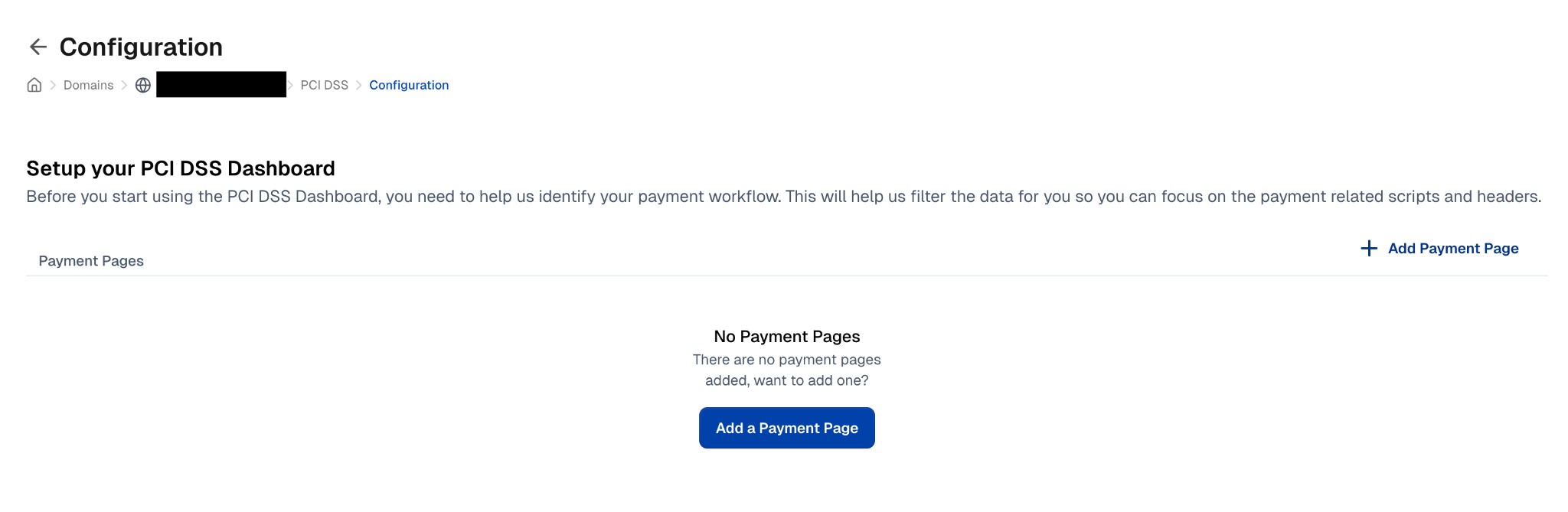
The PCI DSS dashboard is a team-level page that covers every domain in your team. To open it, go to the dashboard and select PCI DSS under Compliance in the sidebar.
Adding payment pages
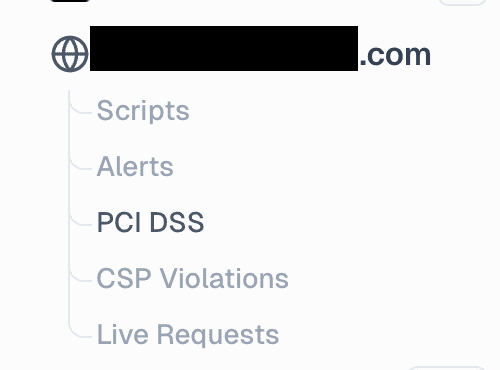
Before you start using the PCI DSS dashboard, you need to identify your payment pages. This filters the data so you can focus on payment-related scripts and headers. Payment pages are managed for the whole team in Team Settings > PCI DSS.
- Open Team Settings > PCI DSS, or click Configure at the top of the PCI DSS dashboard
- Click Add Payment Portal
- Pick the domain and enter the payment page URL pattern. Patterns are supported:
*matches any value,:namematches a single path segment, and{a,b}matches either value
- Click Add
To change a pattern later, use the edit action on its row and click Save.
If you want all scripts to be included in your PCI dashboard, use a pattern that matches everything.
You don’t need a trailing * to match a payment page’s query string. A pattern for example.com/checkout also matches example.com/checkout?sessionId=123, because query strings are stripped before the pattern is applied.
Find a configured payment portal
In Team Settings > PCI DSS, use the search box above the payment portals to find a domain or configured URL path, such as checkout.
A domain-name match shows all configured paths for that domain. A path match shows only matching paths. Results expand while you search so you can see the matching configuration. Clear the search to return to the full list.
Searching only filters the list. It does not change your payment patterns or PCI DSS scope.
Page setup
Payment pages are configured by URL. This setup filters the script list to only show scripts present on your designated payment pages.
Page setup works best when your payment pages are:
- Server-side rendered (SSR)
- Loaded through a page reload/navigation
- Isolated from scripts present during client-side navigation
Limit monitoring to checkout pages
For teams where cside has enabled this control, Team Settings > PCI DSS shows Limit monitoring to checkout pages. It is off by default. Enable it after configuring at least one checkout path, then confirm the narrower monitoring scope. Checkout paths are included in page monitoring scope; any separately configured page-scope patterns still apply. This can reduce monitored page-view volume.
Turning it off takes effect without a confirmation dialog. If you remove the last checkout path, cside turns the control off so the team is not left with an empty checkout scope.
Reviewing scripts by vendor
The PCI DSS dashboard groups every payment page script under the vendor that serves it. You review by vendor instead of one script at a time, which keeps Requirement 6.4.3 manageable when a single vendor loads dozens of scripts. Open the Vendors tab of the PCI DSS dashboard to see the grouped list.
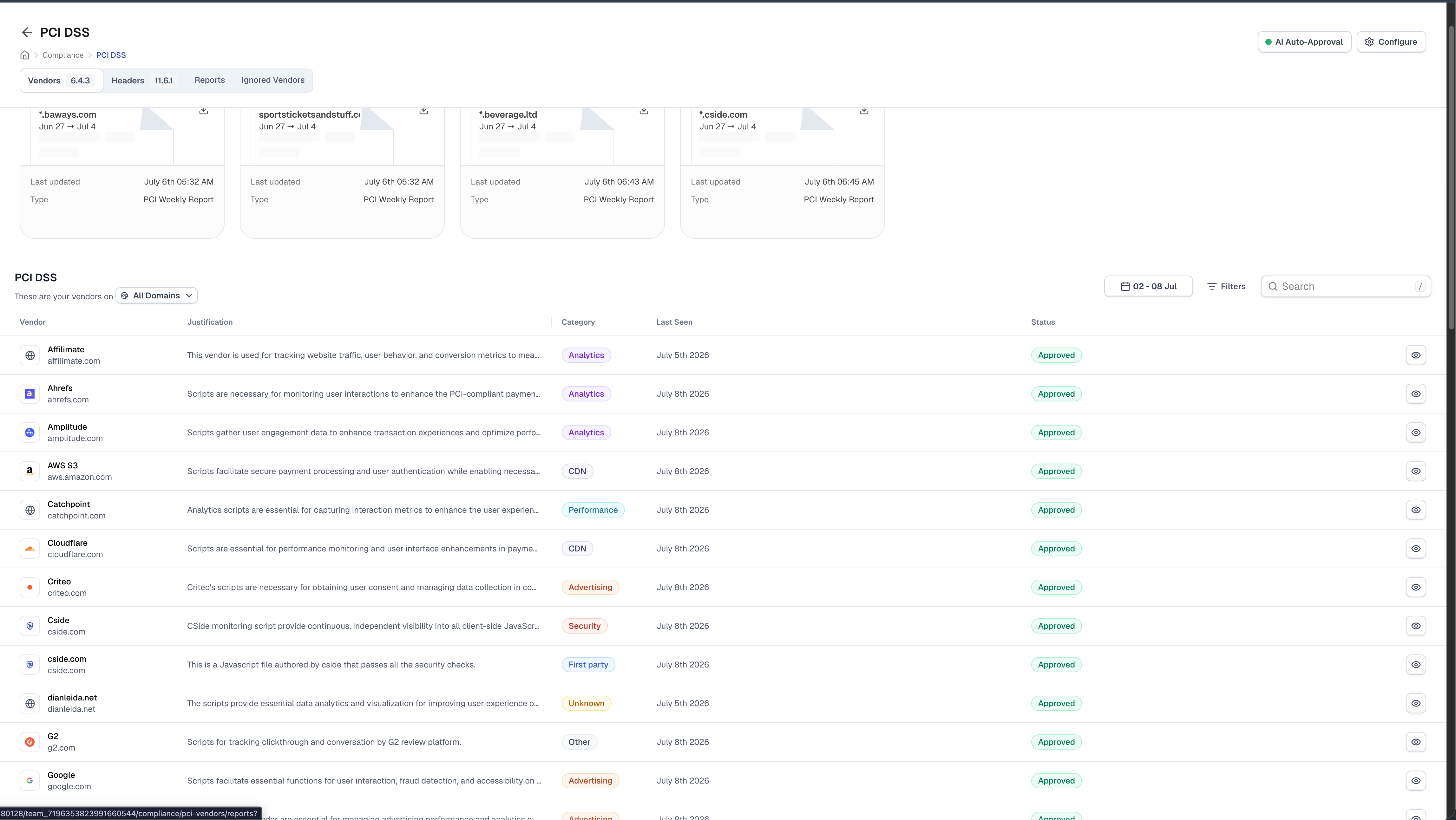
Each row is one vendor, with its category, business justification, last-seen date, and review status (Approved or Requires Action). cside sorts payment page scripts into three vendor types:
- Known vendors: scripts mapped to an identified company, such as Google or Stripe, are grouped under that vendor.
- First Party: scripts served from your own domains are grouped under a single First Party vendor.
- Unknown vendors: scripts with no identified owner are grouped by their root domain.
Approving a vendor authorizes every script it runs on your payment pages in one action. cside proposes a business justification for each vendor, which you review and confirm. You can auto-approve your first-party scripts, and you can turn on AI auto-approval so cside clears the vendors it has already reviewed. Your team then spends its time on the vendors that still need a decision.
Filter the list by payment page, review status, or vendor category, and set the date range to match your audit window.
Drilling into a vendor’s scripts
Click a vendor to open its review panel and see the individual scripts behind it. Each script lists its URL, request count, and last-seen date, along with the justification it inherits from the vendor.
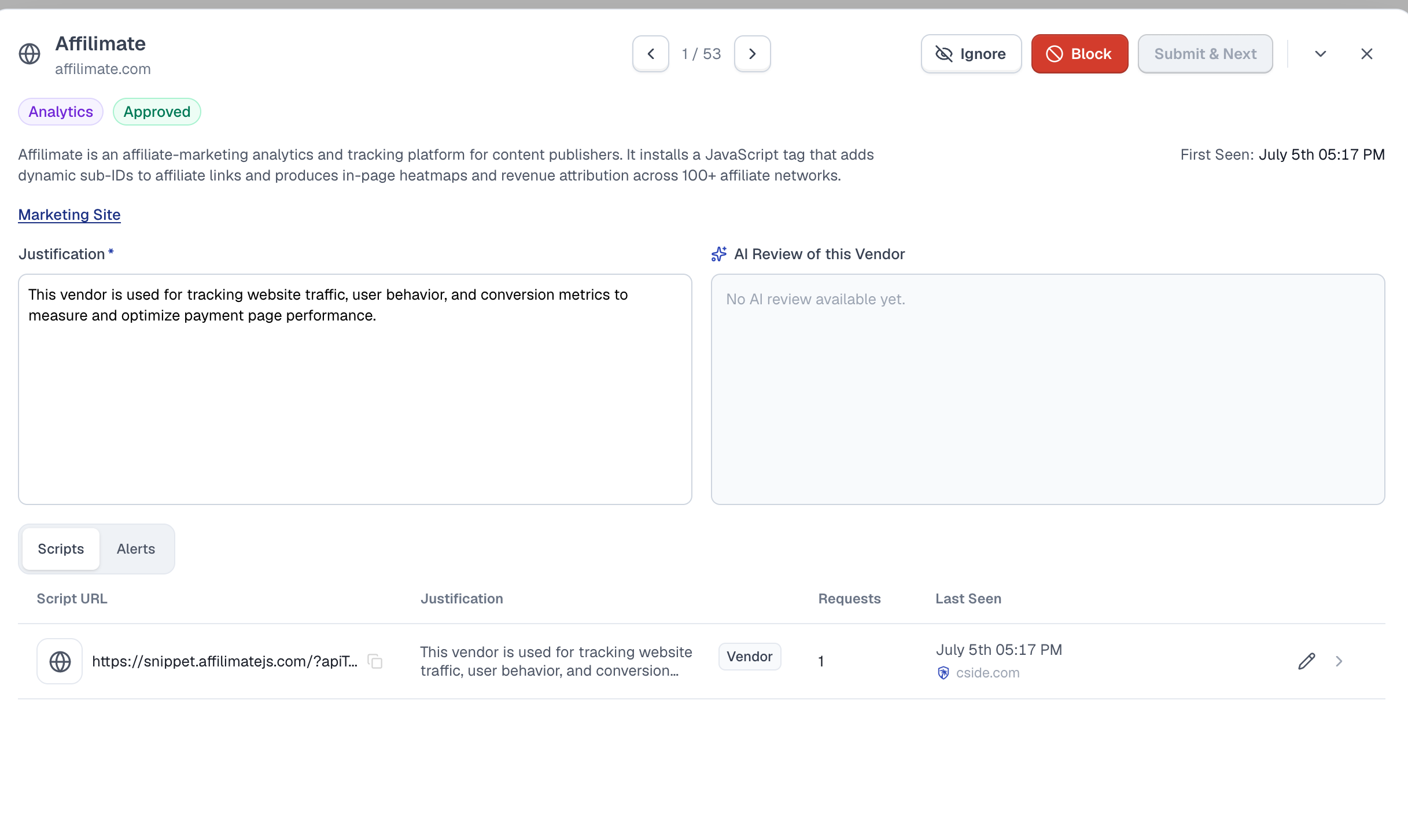
From the panel you can:
- Inspect a single script and open its full payload.
- Write a script-specific justification that overrides the vendor default for that script only. Until you save an override, the panel shows the vendor’s justification as the inherited value; saving one doesn’t change the vendor’s default or any other script.
- Approve, block, or ignore the vendor. Ignoring hides its scripts from the main vendor list and PCI reports while they keep loading. It can be useful for browser extension scripts outside PCI DSS scope.
- Review any alerts cside has raised for that vendor.
Ignoring a First Party vendor requires a written justification. It hides that domain’s own scripts from the main PCI list and reports without stopping those scripts or changing another domain’s review. Restore it from Ignored Vendors. Block is unavailable for First Party vendors.
Frequently asked questions
What do PCI DSS Requirements 6.4.3 & 11.6.1 require?
PCI DSS Requirement 6.4.3 requires payment page scripts to be authorized, checked for integrity, inventoried, and justified. Requirement 11.6.1 requires change and tamper detection for security-impacting HTTP headers and payment page script content as received by the consumer browser.
How does client-side security protect payment pages?
Client-side security protects payment pages by monitoring the scripts that execute in the browser, detecting unauthorized changes, and alerting when script behavior suggests data theft or tampering. cside adds runtime visibility so teams can see what third-party scripts load, what they request, and whether they interact with sensitive checkout flows.
How does cside address Magecart, e-skimming, and formjacking?
cside analyzes script payloads, sub-requests, source metadata, and runtime behavior for signs of Magecart, e-skimming, formjacking, and related browser-based attacks. When cside detects malicious behavior, it can alert your team and, in Script Method, block the script or specific script actions.
Is Scan Method alone enough for PCI DSS?
Yes. Scan Method is designed to satisfy the periodic inventory and change-detection expectations in PCI DSS 6.4.3 and 11.6.1. Script Method adds continuous runtime monitoring and blocking for teams that want stronger client-side protection beyond the minimum compliance bar.
How do cside reports help QSAs and audit evidence?
cside reports show payment page URLs, detected scripts, header changes, authorization decisions, business justifications, authors, and timestamps. This gives QSAs evidence that payment page scripts are tracked and reviewed instead of relying on screenshots or manual spreadsheets.
Does cside enforce script controls or only monitor?
Both, depending on the method. Script Method can block scripts and specific actions at runtime and also blocks CSP injection attempts aimed at disabling the monitor. Scan Method is monitoring only by design. PCI DSS explicitly allows post-authorization scanners, and the PCI SSC has confirmed this directly.
How real-time is detection?
Script Method runs inline in the user’s session and wraps most browser APIs to observe how scripts mutate the DOM, so analysis happens as scripts execute. The same payload hash is not analyzed twice because there is no security value in doing so. 11.6.1 does not require 100% session monitoring; periodic evaluation is sufficient, and cside meets both the periodic and continuous bars.
How does cside handle novel or obfuscated attacks?
Detection is not signature-based on the parent script. cside logs every sub-request made by a script, deobfuscates payloads before evaluation, and runs AI deep analysis on anything that crosses its risk threshold. Novel and zero-day payloads are a specific design target. See Threat Detection for the full detection pipeline.
How are business justifications tracked?
The PCI DSS dashboard records every justification in the UI and in the audit log, including who authored or edited it and when. AI-generated justifications are explicitly allowed by the PCI SSC and are presented to the reviewer for confirmation rather than auto-accepted.
How are scripts grouped in the PCI DSS dashboard?
cside groups every payment page script under the vendor that serves it, so you authorize and justify by vendor instead of script by script. Known vendors appear under their company name, your own scripts group under a First Party vendor, and scripts with no identified owner group by their root domain. Click any vendor to see and justify the individual scripts behind it.
Related pages
Thanks for your feedback!